

What That Means for Your Store
Across the retail and technology landscape, suppliers and manufacturers have advised of
coming price increases led by component shortages, driven by the global appetite for AI
making computer parts scarce. As technology standards in the industry continue to advance, supply constraints are expected to impact retail hardware from March 2026.
The upgrades that could be needed in your store are designed to improve reliability, security, and speed — ultimately creating an efficient and connected experience for both retailers and shoppers.
In most cases, they are also mandated by your banner group to maintain compliance and support new programs.
At Future Net, our main priority is aligning your store with the latest technology to support your growth.
 Why These Changes Are Happening
These updates reflect ongoing industry processes — driven by customer experiences and stronger system requirements. The key drivers include:
QR codes, Phone Screens & Modern Scanning Expectations
-
The growing use of QR codes, digital coupons and phone-based loyalty cards means, older scanners can struggle to meet new standards.
Customers increasingly expect to use their phone at checkout. Whether it’s a loyalty app, a digital receipt, or a QR offer, modern scanners make this efficient and reliable.
The industry is also adopting newer barcode formats like GS1, which provide richer information and improve accuracy across stock, pricing and promotions.
Older scanners simply don't have the hardware required to read these newer formats.
In the case of scanner scales, modern scales will also support new features like AI
produce recognition.
Cloud-based Services to Support Better Loyalty Experiences
-
Host companies are upgrading their loyalty platforms and customer tools, with many of these new systems relying on Microsoft cloud services for faster, more reliable performance at the register.
To support this shift, PCs must run modern versions of Windows that can connect
securely to Microsoft’s cloud environment.Legacy machines lack some components or security standards required for these
services.
Cloud features still operate on older devices, but performance is slower and long-term
compatibility is uncertain.
Newer hardware is designed to support these systems properly, ensuring smoother
workflows and a better experience for your customers.
Modern Security Requirements
-
With in-store technology becoming increasingly connected, the industry is raising
security standards to better protect store systems, payment flows, and customer data.New applications require modern Windows components, encrypted communication,
and up-to-date security protocols to operate safely and reliably.Older PCs and operating systems weren’t built with these modern security
frameworks in mind; over time they won’t be able to run new tools or connect
securely to updated services.This applies to all stores, and is especially important for stores using loyalty or
customer-facing integrations, where secure communication is essential.Newer hardware ensures your store remains protected, receives ongoing security
updates, and can safely run the systems being introduced across the industry.
These changes are already in motion, and we’ll help you understand what they mean for your store and how to prepare for what’s ahead.
How Will These Changes Affect Your In-Store Hardware?
Future Net is committed to supporting your store through these updates, and we always aim to keep our software compatible with your existing hardware.
However, as new standards roll out, some older devices will no longer meet the required processing, security, and scanning capabilities. This typically includes:
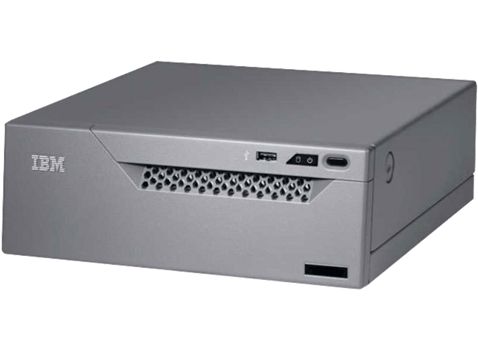
1. PCs Running Windows XP or Windows 7
Older PCs (often 10–15 years old) may technically run some newer software, but the
experience won’t be optimised. They often struggle with slower transactions, delays
sending/receiving data, queues forming because the PC can’t keep up, and frustrated staff when loyalty or cloud-based features are enabled.
How to check
If your POS feels slow, check your PC’s age or Windows version. If it’s running XP or
Windows 7, or is more than 10 years old, upgrading will significantly improve speed and
stability.
It will also allow you to take advantage of free software and performance upgrades
from Future Net, like the new PDE app, and feature upgrades to Back Office, coming
in 2026.
2. Older Infrared Touchscreens
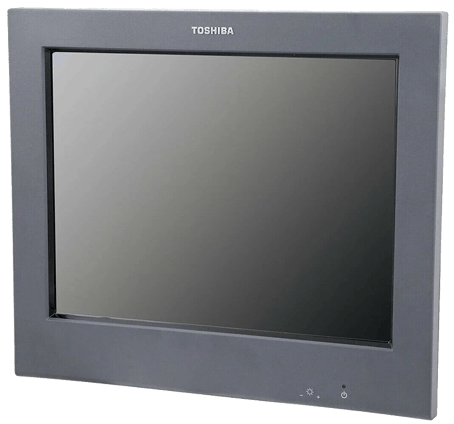
Even with modern PCs, outdated touchscreens can limit your system’s performance. Infrared screens weren’t designed for fast, modern POS use — they detect finger breaks in a light grid rather than responding to touch — which can cause delayed button presses, missed touches, and inconsistent performance.
How to recognise
Infrared touchscreens are deeply inset into the frame (photo example below). If your POS feels “laggy” despite having a new PC, the touchscreen may be the bottleneck.
3. Scanners Without QR or GS1 Support
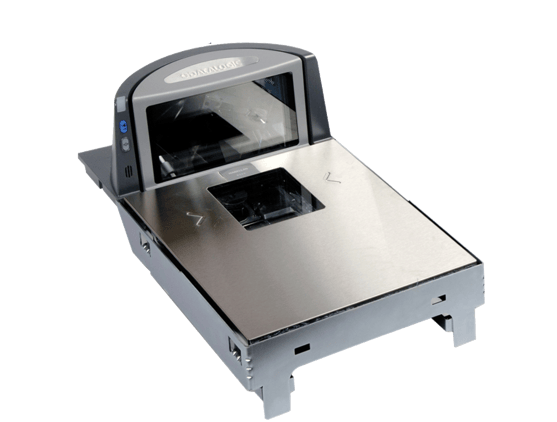
Many stores are increasingly using QR codes, digital loyalty cards and phone-screen scanning. Older scanners were never built to handle these formats and cannot read them reliably.
How to Check
Newer scanners (e.g., Datalogic 9300 series) can read QR and GS1 codes. You can confirm compatibility by checking the information sticker on the unit.
No Need to Panic — Nothing Changes Overnight!
These updates are happening across the industry, and our goal is to help you plan with
confidence rather than rush into immediate action.
What Are the Benefits of Moving to Newer Hardware?
Upgrading older devices isn’t just about staying compatible with new standards — it also helps your store run faster, smoother and more reliably. Key improvements include:
Better support for digital loyalty and phone-based scanning
Modern hardware handles QR codes, digital offers, and mobile loyalty apps instantly, providing customers a faster, more seamless checkout experience.
Quicker, more accurate scanning
New scanners can read modern barcode formats (including GS1), and respond faster, reducing mis-scans and keeping customer flow moving.
Smoother checkout experience
Faster processing with fewer delays and interruptions leads to shorter queues and happier staff and customers.
More reliable day-to-day operation
Newer PCs and peripherals handle cloud services, security checks, and data processing with higher reliability — reducing lag, freezing, and slowdowns.
Stronger protection for your store systems
Modern hardware, combined with updated Windows components and security protocols, helps protect your store as cyber threats and compliance requirements evolve.
Ability to take advantage of new software efficiencies
For example, the new PDE app requires a back office running Windows 10+. Or, AI produce recognition requires a Datalogic Magellan 9600 with a least one colour
scanner.
Plan Your Transition at Your Own Pace
Every store is different, and there’s no one-size-fits-all timeline. That’s why we’re here to
help you create a hardware roadmap tailored to your store, your budget, and your priorities — whether that means upgrading a single scanner this year or planning a full refresh over time.
Let’s Get Your Store Ready for What’s Next!
Need guidance on your current setup or when to make the next step? We’re here to help guide you.
Together, we’ll make sure your store is ready for the future, in line with your vision.